Thursday, October 8, 2015

Thursday & Friday Oct 8th & 9th Days 32 & 33


________________________________________________________________________________


Latitude and Longitude Section

Objective(s): Presented with a presentation covering the basic elements of Latitude and Longitude, students will be bale to identify various locations around the world based on their latitude and longitude coordinates.
-The student, when requested, will identify at least 10 places on the world map using the given latitude and longitude points to the nearest whole degree with 90% accuracy.
- The student, when requested, will identify the latitude and longitude points of at least 10 places on the world map to the nearest whole degree with 90% accuracy.

Rationale: Understanding how places are positioned and identified on a world map, allows students to better grasp the various characteristics on locations, such as climate, vegetation, animal life etc.

Evidence: Being able to use and understand Latitude and Longitude on a world map, allows students to locate just about anything.

_________________________________________________________________________________


Finish the Lattude and Longitude presentation - ( here )

Timed Quiz/Contest -Latitude/Longitude - ( here )
Use the Activity #4 Map as the answer sheet for all of the activities. Label each activity separately and answer the questions. Act #4 asks you to draw on the map, that is why I copied the map and placed it on a google sheet.

Act #4 Directions - ( here )      Activity #4 Map - ( here ) (use this as your answer sheet for all activities)
Measuring Longitude Activity - ( here )
Lat Map Location Calif Activity - ( here )
Lat Map USA Activity - ( here )
________________________________________________________________________________

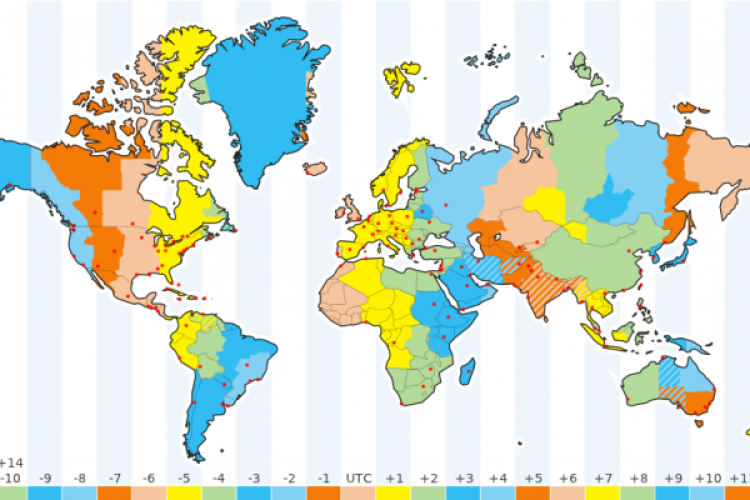
Time Zone Project
 Directions -  ( here )  
Make sure you use a blank piece of printer paper for this assignment
________________________________________________________________________________

When the class finishes the Time Zone Project, we will start the History of Mapping Section


________________________________________________________________________________


History of Map Making presentation
Presentation  - ( here )

________________________________________________________________________________
EXPLORERS PROJECT


When learning about early Map Making, it should transition into how were those maps used and or expanded into the maps we know today. For that we will study early explorers to understand why they ventured out to "discover" new lands and how maps were shaped by these voyages.

An explorer will be assigned to each student.The Explorer you are assigned is the explorer with the same number as your current seat.
i.e student sitting at seat 11 gets explorer #11
The directions for the project are listed below

This is the world Map you will use on your Explorers project - ( here ) 

This map is very big, and you should crop out the part of the Map where your Explorer took his voyage(s). Use Google Slides to draw the path(s) from where your Explorer started and where he landed. Be sure to use dates and different colors to depict different voyages (if he in fact took more than one voyage)

Explorers Project - Directions Page: ( Link )


Resources for the Project
Famous Explorers - ( here )
Explorers Name and links to informational websites: ( Link )
Explorers Information website:( Link )  
All about Explorers:( Link )
Notable Explorers: ( Link )
Conquistadors: ( Link )


Monday, October 5, 2015

Tuesday and Wednesday Oct 6th & 7th Days 30 & 31

Latitude and Longitude Section

Objective(s): Presented with a presentation covering the basic elements of Latitude and Longitude, students will be bale to identify various locations around the world based on their latitude and longitude coordinates.
-The student, when requested, will identify at least 10 places on the world map using the given latitude and longitude points to the nearest whole degree with 90% accuracy.
- The student, when requested, will identify the latitude and longitude points of at least 10 places on the world map to the nearest whole degree with 90% accuracy.

Rationale: Understanding how places are positioned and identified on a world map, allows students to better grasp the various characteristics on locations, such as climate, vegetation, animal life etc.

Evidence: Being able to use and understand Latitude and Longitude on a world map, allows students to locate just about anything.

_________________________________________________________________________________


Latitude and Longitude presentation -( here )
Latitude and Longitude Review video -( here )

TimeZone vid( here )

Timed Quiz/Contest -Latitude/Longitude - ( here )
Use the Activity #4 Map as the answer sheet for all of the activities. Label each activity separately and answer the questions. Act #4 asks you to draw on the map, that is why I copied the map and placed it on a google sheet.


Act #4 Directions - ( here )      Activity #4 Map - ( here ) (use this as your answer sheet for all activities)
Measuring Longitude Activity - ( here )
Lat Map Location Calif Activity - ( here )
Lat Map USA Activity - ( here )
________________________________________________________________________________


Monday Oct 5th Day 29

First thing is to get your assignment sheet updated.

Today we are starting the Unit on Latitude and Longitude as well as European Exploration

Introduction to the Unit

We are beginning our Unit on Latitude/Longitude  and the History of Cartography (map making). In this unit students will learn about the challenges early map makers had in representing an accurate picture of their surroundings. Many early map makers had limited to no technology at their disposal and had to develop a way to represent various land features, coast lines, mountains, etc. This led to many early maps being incredibly limited and inaccurate. These inaccuracies led many expeditions to unknown parts of the world and resulted in some very destructive behaviors as well as new found places and people. This unit will cover various explorers, and the lands they mapped-out for future exploration.

Objectives- 
*Given a blank piece of paper, the student will experience the challenges of a cartographer in producing and accurate map based solely on verbal instructions.
*Given a fictitious land mass to view, students will use only cardinal direction in describing the details to a amateur cartographer in producing a map.
*Given a description of a fictitious island, students will use recently acquired mapping skills to produce an accurate replication of the described land.
* Given a blank piece of paper students will be able to draw a relatively accurate map of a familiar place they know very well.


Rationale:-  Understanding the challenges with making accurate maps will teach the studens the reasons why early explorers wre usually dumbfounded when venturng off into unchartered waters

Evendence:- Students will be able to use an atlas and latitude/longitude coordinates to locate various places wihin the world as part of a scavenger hunt


Does this look very accurate?
Today you will get a chance to experience what being an ancient cartogropher was like...


________________________________________________________________________________


Thursday, September 24, 2015

Thursday & Friday Sept 24th & 25th Days 27 & 28

Day 3 of the Mapping the school scavenger Hunt project

Objective: Given access to a fully functioning Chromebook with access to Google Docs, students will import a map of the school and place various shapes and pictures on its surface to identify various locations on campus as part of a scavenger hunt activity

Rationale:  Understanding the campus and where things are located will assist Freshmen in knowing their "place" of school

Evidence: Accurately and successfully placing pics and shapes on the school map within the time allotted
____________________________________________________________________________


Step 1. Each student will open a Google Slide and apply these requirements:
  • Four shape boxes
  • At least three colors
  • One fun line
  • Have one text box 
  • Picture of you (yes a selfie) or other pic you may have (of you) 
  • Submitted to Google Classroom. Per3_LastName_MappingExercise
Example - ( here ) 
Step 2. Get grouped with a partner who has a phone that can take pics.

Step 3. Open the assignment sheet for the Mapping Project - ( here )

Step 4. download and place the 2 school maps into a google slides doc - ( school Map - entire campus)     School Map Main Office - ( office Map)


Tuesday, September 22, 2015

Tuesday & Wednesday Sept 22 and 23, Days 25 & 26

Day 2 of the Mapping the school scavenger Hunt project

Objective: Given access to a fully functioning Chromebook with access to Google Docs, students will import a map of the school and place various shapes and pictures on its surface to identify various locations on campus as part of a scavenger hunt activity

Rationale:  Understanding the campus and where things are located will assist Freshmen in knowing their "place" of school

Evidence: Accurately and successfully placing pics and shapes on the school map within the time allotted
____________________________________________________________________________


Step 1. Each student will open a Google Slide and apply these requirements:
  • Four shape boxes
  • At least three colors
  • One fun line
  • Have one text box 
  • Picture of you (yes a selfie) or other pic you may have (of you) 
  • Submitted to Google Classroom. Per3_LastName_MappingExercise
Example - ( here ) 
Step 2. Get grouped with a partner who has a phone that can take pics.

Step 3. Open the assignment sheet for the Mapping Project - ( here )

Step 4. download and place the 2 school maps into a google slides doc - ( school Map - entire campus)     School Map Main Office - ( office Map)


Monday, September 21, 2015

Monday Sept 21st Day 24

Objective: Given access to a fully functioning Chromebook with access to Google Docs, students will import a map of the school and place various shapes and pictures on its surface to identify various locations on campus as part of a scavenger hunt activity

Rationale:  Understanding the campus and where things are located will assist Freshmen in knowing their "place" of school

Evidence: Accurately and successfully placing pics and shapes on the school map within the time allotted
____________________________________________________________________________
Step 1. Each student will open a Google Slide and apply these requirements:
  • Four shape boxes
  • At least three colors
  • One fun line
  • Have one text box 
  • Picture of you (yes a selfie) or other pic you may have (of you) 
  • Submitted to Google Classroom. Per3_LastName_MappingExercise
Example - ( here ) 
Step 2. Get grouped with a partner who has a phone that can take pics.

Step 3. Open the assignment sheet for the Mapping Project - ( here )

Step 4. download and place the 2 school maps into a google slides doc - ( school Map - entire campus)     School Map Main Office - ( office Map)

Thursday, September 17, 2015

Thursday Sept 17th Day 23

Objective: Given access to a fully functioning Chromebook with access to Google Docs, students will import a map of the school and place various shapes and pictures on its surface to identify various locations on campus as part of a scavenger hunt activity

Rationale:  Understanding the campus and where things are located will assist Freshmen in knowing their "place" of school

Evidence: Accurately and successfully placing pics and shapes on the school map within the time allotted
____________________________________________________________________________
Step 1. Each student will open a Google Slide and apply these requirements:
  • Four shape boxes
  • At least three colors
  • One fun line
  • Have one text box 
  • Picture of you (yes a selfie) or other pic you may have (of you) 
  • Submitted to Google Classroom. Per3_LastName_MappingExercise
Example - ( here )
Step 2. Get grouped with a partner who has a phone that can take pics.

Step 3. Open the assignment sheet for the Mapping Project - ( here )

Step 4. download and place the 2 school maps into a google slides doc - ( school Map - entire campus)     School Map Main Office - ( office Map)


Tuesday, September 15, 2015

Tuesday Sept 15th Day 22

Objective: Given access to a fully functioning Chromebook with access to Google Docs, will summarize a Early Mapmaking article
answering specific questions.

Rationale:  Understanding how to sumamrize and annotate an article will increase a students ability to acquire knowledge.

Evidence: Accurately sumamrizing an article and pull out the answers.
____________________________________________________________________________
Two assignments online.
1.      Students will read the El Salvador excerpt and the Azerbaijan expcerpt. They will then make two charts in the same document for each excerpt. They will submit the documents to google classroom.

Use the pdf on Elsalvador and replicate the table at the bottom, and answer the questions on a separate Google Doc - ( El Salvador pdf here )...( Azerbaijan here ) when finished submit to google classroom

2.      Students will read Early mapping article. 
Access the Early Mapmaking article. -Early Mapmaking Article - ( article here )
Secondly, access the article form.- Early Mapmaking Article answer Form-  ( questions and form here ).
On a separate google doc use the Table tool (insert table) to replicate the table on the student answer sheet. Answer the questions that are listed at the end of the article, by writing the answer to the question as a sumamry on the left side of the table, and answering the 3 questions on the right side of the table.

When you are finished you should have submitted 2 assignments to tgoogle clsassroom
1.  is the 5 Themes activity on El Salvador and Azerbeijan.
2.  is the Early Mapmaking article


If you still have time, you can start on the next map making article - ( article here )


Thursday, September 10, 2015

Monday Sept 14th Day 21

 Fairy Tale Project - Gallery Walk and Evaluation

Objective: Given access to a fully functioning Chromebook with access to Google Docs, students will be displaying their fairy tale rewrite for their classmates to evaluate. Students will be able to identifu the 5 themes within the fairy tale rewrite and evluate the information to see if each fairy tale followed the guidelines of the assignment

Rationale:  Understanding how the 5 themes effects different locations and therefore would effect how stories are told in those locations allows for students to see the world from a different perspective.

Evidence: Accurately evaluating the various stories will demonstrate a students ability to identify the 5 Themes within Culturally based fairy tales.
____________________________________________________________________________

( Gallery Walk eval sheet )

Thursday and Friday Sept 10 & 11 Days 19 & 20

Final Day of the Fairy Tale Project 

Objective: Given access to a fully functioning Chromebook with access to Google Docs, students will be able to apply the 5 themes of geography to re-write a classic Fairy Tale and have it occur in a completely different culture from the original

Rationale:  Understanding how the 5 themes effects different locations and therefore would effect how stories are told in those locations allows for students to see the world from a different perspective.

Evidence: Building the Fairy Tale to accurately reflect the new location will demonstrate evidence that the student understands the 5 themes of geography
________________________________________________________________________________________________________________

Day 2 should be used to re-write the Fairy Tale and change the appropriate elements with the elements that would occur in the new culture.

Please refer to the re-write directions sheet - ( Rewrite Directions ) 

________________________________________________________________________________________________________________

When you finish with your re-write, start to create the new version of the story using the Google Docs presentation tool, or make it with your partner using art materials.


Our plan is to present (gallery walk evaluation) on the 2nd block of ths week

Monday, September 7, 2015

Tuesday Sept 8th Day 18

Day 2 of the Fairy Tale Project - 

Objective: Given access to a fully functioning Chromebook with access to Google Docs, students will be able to apply the 5 themes of geography to re-write a classic Fairy Tale and have it occur in a completely different culture from the original

Rationale:  Understanding how the 5 themes effects different locations and therefore would effect how stories are told in those locations allows for students to see the world from a different perspective.

Evidence: Building the Fairy Tale to accurately reflect the new location will demonstrate evidence that the student understands the 5 themes of geography
________________________________________________________________________________________________________________

Day 2 should be used to re-write the Fairy Tale and change the appropriate elements with the elements that would occur in the new culture.

Please refer to the re-write directions sheet - ( Rewrite Directions ) 

________________________________________________________________________________________________________________

When you finish with your re-write, start to create the new version of the story using the Google Docs presentation tool, or make it with your partner using art materials.


Our plan is to present (gallery walk evaluation) on the 2nd block of ths week

Friday, September 4, 2015

Friday Sept 4th Day 17

5 Themes Test Day

When you finish with the test, continue on your Fairy Tale Project


Thursday, September 3, 2015

Wed & Thursday Sept 3rd & 4th Day 15 & 16

Day 1 of the Fairy Tale Project - 

Objective: Given access to a fully functioning Chromebook with acces to Google Docs, students will be able to apply the 5 themes of geography to re-write a classic Fairy Tale and have it occur in a completey different culture from the original

Rationale:  Undestanding how the 5 themes effects different locations and therefore would effect how stories are told in those locations allows for students to see the world from a different perspective.

Evidence: Building the Fairy Tale to accurately reflect the new location will demonstrate evidence that the student understands the 5 themes of geography
________________________________________________________________________________________________________________

You will be paired wth another student, you will collectivley decide on a Fairy Tale as well as a new location in which to depict the story.

________________________________________________________________________________________________________________

Wednesday, September 2, 2015

Tuesday Sept 2nd Day 14

Day 1 of the Fairy Tale Project - 

Objective: Given access to a fully functioning Chromebook with acces to Google Docs, students will be able to apply the 5 themes of geography to re-write a classic Fairy Tale and have it occur in a completey different culture from the original

Rationale: Undestanding how the 5 themes effects different locations and therefore would effect how stories are told in those locations allows for students to see the world from a different perspective.

Evidence: Building the Fairy Tale to accurately reflect the new location will demonstrate evidenc tha the student undeetands the 5 themes of geography
________________________________________________________________________________________________________________

You will be paired wth another student, you will collectivley decide on a Fairy Tale as well as a new location in which to depict the story.

________________________________________________________________________________________________________________

Monday, August 31, 2015

Monday Aug 31st Day 13

Day 2 of the 5 Themes Project - By the end of the period, each group should select one person to uplaod the finished project into the Google Classroom folder P2_LastNames (alphabetical)_5Themes

Objective: Given access to a fully functioning Chromebook with acces to Google Docs, students will be able to use the slides tool to create an poster of one of the 5 themes of geography.

Rationale: Undestanding how to use the tools of Google Docs will help in future assignments where students will be expected to know how to access and apply tools

Evidence: Building the poster independently of the other group members will show evidence ta ttne skills have been acquired
________________________________________________________________________________________________________________

The 5 Themes Project will place you into groups of 5 (each student will be assigned one of the 5 themes) your assignment is to build a 8 X 11 page displaying and explaining the 5 theme you have been assigned. All 5 of the pages in your group should have a similar themes to them. They should look like they are part of a package.
________________________________________________________________________________________________________________
Here is the directions sheet for the 5 themes project - ( Directions)
________________________________________________________________________________________________________________

One of the fist steps will be an introduction to Google Slides App. After learning the basic featuresof the Slides App, students will be put into groups and will begin the project.  
________________________________________________________________________________________________________________

Friday, August 28, 2015

Thursday & Friday Aug 27th & 28th Days 11 & 12

Objective: Given access to a fully functioning Chromebook with acces to Google Docs, students will be able to use the slides tool to create an poster of one of the 5 themes of geography.

Rationale: Undestanding how to use the tools of Google Docs will help in future assignments where students will be expected to know how to access and apply tools

Evidence: Building the poster independently of the other group members will show evidence ta ttne skills have been acquired
________________________________________________________________________________________________________________

The 5 Themes Project will place you into groups of 5 (each student will be assigned one of the 5 themes) your assignment is to build a 8 X 11 page displaying and explaining the 5 theme you have been assigned. All 5 of the pages in your group should have a similar themes to them. They should look like they are part of a package.
________________________________________________________________________________________________________________
Here is the directions sheet for the 5 themes project - ( Directions)
________________________________________________________________________________________________________________

One of the fist steps will be an introduction to Google Slides App. After learning the basic featuresof the Slides App, students will be put into groups and will begin the project.  
________________________________________________________________________________________________________________

When building your page, you should follow the CRAP principle of design. CRAP Principle


Tuesday, August 25, 2015

Tuesday and Wednesday Aug 25th & 26th Days 9, 10

Objective: Given a presentation of the 5 themes of geography, students will be able to list the various themes and provide examples of each and how they impact their daily lives.

Rationale: Understanding the world around them from a global perspective will help students relate to the globalization of their community.

Evidence: Providing examples of each theme and how it affects their lives, will allow students to demonstrate their understanding of the 5 themes.


After the video we will start the 5 Themes of Geography presentation - ( 5 themes )


When taking notes of the 5 Themes design your notes with this format - ( format)


The 5 Themes Project will place you into groups of 5 (each student will be assigned one of the 5 themes) your assignment is to build a 8 X 11 page displaying and explaining the 5 theme you have been assigned. All 5 of the pages in your group should have a similar themes to them. They should look like they are part of a package.
________________________________________________________________________________________________________________
Here is the directions sheet for the 5 themes project - ( Directions)
________________________________________________________________________________________________________________

One of the fist steps will be an introduction to Google Slides App. After learning the basic featuresof the Slides App, students will be put into groups and will begin the project.  
________________________________________________________________________________________________________________

When building your page, you should follow the CRAP principle of design. CRAP Principle


Sunday, August 23, 2015

Monday Aug 24th Day 8

Open the grit worksheet, answer the questions (scratch paper, you will not be turning it in).
We'll watch 2 short videos on Grit and Open Mindset.

Once finished, I will start the presentation on the 5 themes of geography. This will add clarity to the chapter 1 work you did over the weekend.

Our first class project will be on the 5 themes of geography. 

Grit Worksheet - ( Grit worksheet )

________________________________________________________________________________________________________________
Video about Grit -Grit vid  ---(updated)

Open Mindset - (Open Mindset)

Vid #2 ( here)
________________________________________________________________________________________________________________

We will star the remainder of the class with the 5 themes of Geography video called - (Flocabulary )

After the video we will start the 5 Themes of Geography presentation - ( 5 themes )

The 5 Themes Project will place you into groups of 5 (each student will be assigned one of the 5 themes) your assignment is to build a 8 X 11 page displaying and explaining the 5 theme you have been assigned. All 5 of the pages in your group should have a similar themes to them. They should look like they are part of a package.

When building your page, you should follow the CRAP principle of design. CRAP Principle

________________________________________________________________________________________________________________
You will be using the Google Docs Presentation tool to make your 5 themes slide. I will be doing a tutorial of how to access and use the google docs presentation tool. In addition, there are some good resources regarding the presentation tool that can be watched outside of class that will help with your project. (see below)
________________________________________________________________________________________________________________
Here is the directions sheet for the 5 themes project - ( Directions)
________________________________________________________________________________________________________________


A great video of the features of Google drive presentation can be seen by following this link  ( Presentation tool in Drive)


A great video that explains the important design principles in making a presentation. There are additional directions to this video that explain certain features that are advanced, so pay close attention to this first few minutes and the ending summary ( design principles )​


Thursday, August 20, 2015

Thursday & Friday Aug 20th & 21st Day 6 & 7

3 Paragraphs about Me

Objective: Given access to a chromebook, students will be able to access Google Docs and write a 3 paragraph summary about themselves (answering specific questions), using the tools taught in class the previous session. 

Rationale: Students need to utilize the tools taught to them to ensure the learning becomes a part of their skill set.


Evidence: Producing the document and following the directions will demonstrate that students have acquired the basic skills of Google docs (word processing) and can apply those skills to an assignment.


Homework - Textbook Chapter 1 Questions 1-6 on Page 42 (Due Monday)

Grit Worksheet - ( grit worksheet )

Video about Grit -Grit vid

Open Mindset - (vid)

Once the 3 paragraphs about me activity is finished, we will go over how to make a presentation using the Google Docs presentation tool.

A great video of the features of Google drive presentation can be seen by following this link  ( Presentation tool in Drive)


A great video that explains the important design principles in making a presentation. There are additional directions to this video that explain certain features that are advanced, so pay close attention to this first few minutes and the ending summary ( design principles )​

Tuesday, August 18, 2015

Tuesday & Wednesday Aug 18th & 19th Day 5

3 Paragraphs about Me

Objective: Given access to a chromebook, students will be able to access Google Docs and write a 3 paragraph summary about themselves (answering specific questions), using the tools taught in class the previous session. 

Rationale: Students need to utilize the tools taught to them to ensure the learning becomes a part of their skill set.


Evidence: Producing the document and following the directions will demonstrate that students have acquired the basic skills of Google docs (word processing) and can apply those skills to an assignment.


__________________________________________________________________________________________________________
Click Here to get the direction sheet for the 3 paragraphs about me activity for today
__________________________________________________________________________________________________________

If we have time, check out this fruit survey - ( What type of fruit are you? ) After you have determined what food represents you, take the fruit survey and see what type of fruit this website thinks you are......how accurate is it?
__________________________________________________________________________________________________________
Once you are finished answering the questions for the 3 paragraphs about me assignment, we will watch a video on how to share and comment on documents - (on the Video Tutorials Tab)
__________________________________________________________________________________________________________

Once the 3 paragraphs about me activity is finished, we will go over how to make a presentation using the Google Docs presentation tool.

A great video of the features of Google drive presentation can be seen by following this link  ( Presentation tool in Drive)


A great video that explains the important design principles in making a presentation. There are additional directions to this video that explain certain features that are advanced, so pay close attention to this first few minutes and the ending summary             ( design principles )​


Sunday, August 16, 2015

Monday Aug 17th Day 4

3 Paragraphs about Me

Objective: Given access to a chromebook, students will be able to access Google Docs and write a 3 paragraph summary about themselves (answering specific questions), using the tools taught in class the previous session. 

Rationale: Students need to utilize the tools taught to them to ensure the learning becomes a part of their skill set.


Evidence: Producing the document and following the directions will demonstrate that students have acquired the basic skills of Google docs (word processing) and can apply those skills to an assignment.


WARM-UP: Before we start today, write a brief description answering this question:

IF YOU WERE TO SELECT A FOOD TO DESCRIBE YOU, WHAT WOULD IT BE?
EXAMPLE: SOMEONE MAY DESCRIBE THEMSELVES AS AN OLIVE, THEY ARE PERFECTLY FINE BY THEMSELVES, BUT CAN ALSO EASILY BE A PART OF A GROUP


Click Here to get the direction sheet for the 3 paragraphs about me activity for today

__________________________________________________________________________________________________________

If we have time, check out this fruit survey - ( What type of fruit are you? ) After you have determined what food represents you, take the fruit survey and see what type of fruit this website thinks you are......how accurate is it?


__________________________________________________________________________________________________________

Once the 3 paragraphs about me activity is finished, we will go over how to make a presentation using the Google Docs presentation tool.

A great video of the features of Google drive presentation can be seen by following this link  ( Presentation tool in Drive)

A great video that explains the important design principles in making a presentation. There are additional directions to this video that explain certain features that are advanced, so pay close attention to this first few minutes and the ending summary             ( design principles )​

Thursday, August 13, 2015

Thursday Friday Aug 13th and 14th Day 2

 World Cultures

Where have you been activity - line yourself up alphabetically from A to Z based on where you went this last summer. If you did not travel, then you are "S" for San Jose.
Once you have lined-up, think of 1 physical attribute of the place you visitied.

Today we will get our seating assignments, finish the course syllabus, classroom expectations, procedures, etc,etc.

You will log-on to your San Jose Unified Google acct, access the classroom blog, and start the lesson about using Google Docs


Course syllabus - Here it is  (YOU NEED TO BE LOGGED IN TO YOUR SJUSD acct TO ACCESS THE SYLLABUS)

3 Paragrahs about me assignment - Link

Wednesday, August 12, 2015

Wednesday Aug 12th Day 1

 World Cultures

Today we will get temporary seating assignments, go over the course syllabus, classroom expectations, procedures, etc,etc.

You will have access to a google chromebook daily (just like last year) and many of the same procudres will be used (chromebook check-out, proper use policy, etc)

We will also be using Google Classroom for assignment submission (if the assignment is electronic in nature)

My contact: sgillis@sjusd.org

Course syllabus - Here it is  (YOU NEED TO BE LOGGED IN TO YOUR SJUSD acct TO ACCESS THE SYLLABUS)

Wednesday, August 5, 2015

Wednesday, June 3, 2015

Tues Wed Thurs June 2nd, 3rd, & 4th Days 94, 95, 96

FINALS

Tuesday June 2nd
Per 1: 7:55 - 9:55
Break - 9:55 - 10:21
Per 2: 10:26 - 12:26

Wed June 3rd
Per 3: 7:55 - 9:55
Break - 9:55 - 10:21
Per 4: 10:26 - 12:26

Thursday  June 4th
Per 5: 7:55 - 9:55
Break - 9:55 - 10:21
Per 6: 10:26 - 12:26

Monday, June 1, 2015

Monday June 1st Day 93

Dead Day

This period students will update their assignment sheets and turn-in any late work to be counted toward the semester grade. 
Your assignment sheet will be due the day of the FINAL. It can be printed out or submitted into the google classroom folder.

Your Asia Maps are due the day of the FINAL, or can be submitted early.

Here is the point breakdown for the semester:


Including the 20point assignment sheet, the semester total is 1296 pts.
The final is worth 113 pts.

Semester Grade breakdown
1409-1261 = A
1260-1120 =B
1119-979 = C
978 - 838 = D
Below 838 = Does not pass the class